

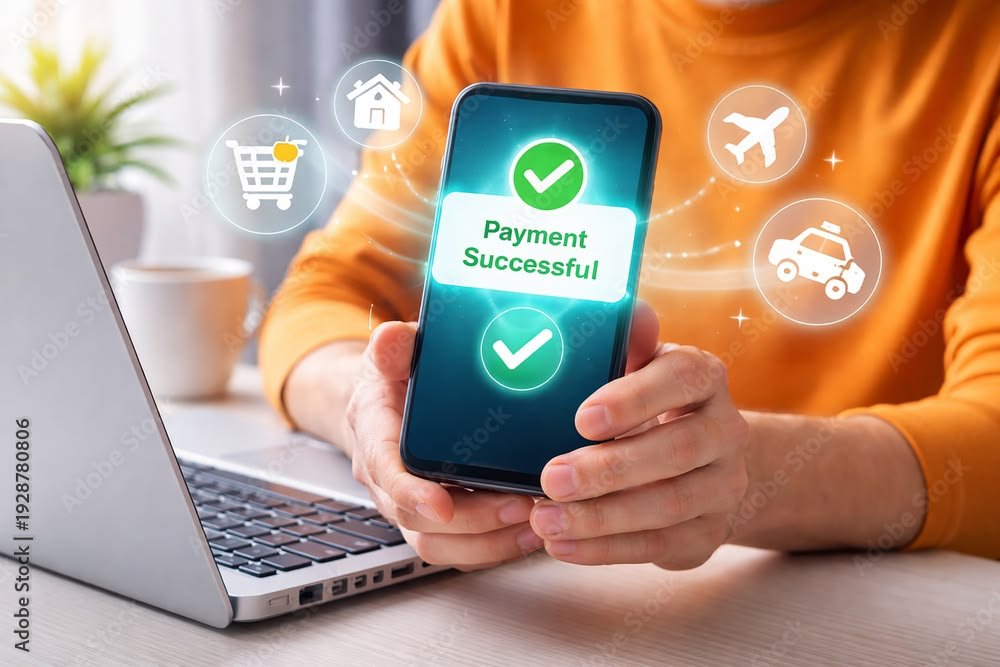
Online banking has changed the way people manage their money. Instead of visiting a bank branch for every transaction, customers can now check their balance, transfer money, pay bills, deposit checks, and manage their accounts from a computer or smartphone.
For many people, online banking is faster and more convenient than traditional banking. However, understanding how online banking works is important before using it regularly. You also need to know how to protect your account and personal information from fraud.
In this guide, we will explain what online banking is, how it works, what you can do through an online banking account, its benefits, common risks, and simple tips for staying safe.
What Is Online Banking?
Online banking is a service that allows you to access and manage your bank account through the internet.
Instead of going to a physical bank branch, you can log in through your bank’s website or mobile app. Once you are logged in, you can perform many common banking activities electronically.
For example, you may be able to:
- Check your account balance
- View recent transactions
- Transfer money
- Pay bills
- Send money to another person
- Manage debit or credit cards
- Download account statements
- Set up automatic payments
- Manage account alerts
- Contact customer support
The exact services available depend on your bank and the type of account you have.
How Does Online Banking Work?
Online banking works by connecting your bank account to a secure website or mobile application.
When you open an online banking account, your bank gives you login credentials. These usually include a username, email address, phone number, password, or another form of identification.
When you want to access your account, you enter your login information. The bank’s system verifies your identity and gives you access to your account.
For additional security, many banks use two-factor authentication. This may require you to enter a one-time code sent to your phone or generated through an authentication system.
Once you are successfully verified, you can access the banking services available to you.
What Can You Do With Online Banking?
Online banking provides access to many everyday financial services.
1. Check Your Balance
One of the most common reasons people use online banking is to check their account balance.
Instead of calling the bank or visiting a branch, you can open the app and see how much money is currently available.
For example, if your monthly income is deposited into your account, you can quickly check whether the payment has arrived.
Checking your balance regularly can also help you avoid accidentally spending more money than you have.
2. View Your Transactions
Online banking allows you to see money coming into and going out of your account.
You may see transactions such as:
- Salary deposits
- ATM withdrawals
- Online purchases
- Utility payments
- Bank fees
- Transfers
- Card payments
Reviewing your transactions is an important financial habit because it can help you identify mistakes or unauthorized activity.
3. Transfer Money
Most online banking platforms allow customers to transfer money electronically.
Depending on the bank, you may be able to transfer money between your own accounts or send money to another person or bank account.
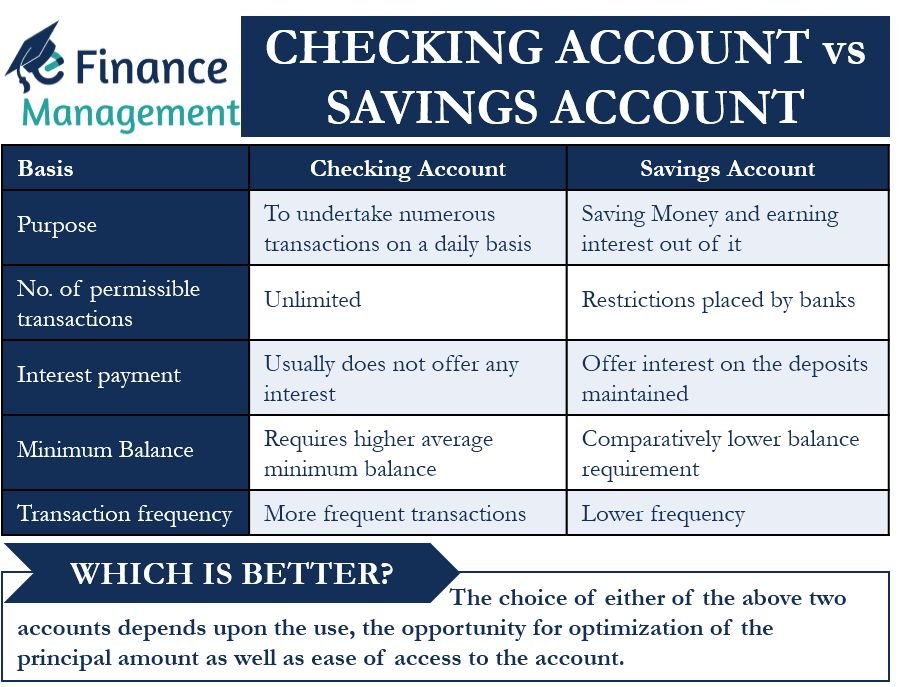
For example, you might transfer money from your checking account to your savings account after receiving your monthly income.
Always double-check the recipient’s information before confirming a transfer.
4. Pay Bills Online
Online banking can make bill payments much easier.
Instead of paying bills manually, you may be able to pay electricity, internet, phone, insurance, or other recurring expenses through your bank account.
Some banks also allow you to schedule payments for a future date.
This can help you avoid missed payments and late fees.
5. Manage Your Debit Card
Many banking apps allow you to manage your debit card directly from your phone.
Depending on your bank, you may be able to:
- Lock or unlock your card
- View card transactions
- Request a replacement
- Change certain card settings
- Set spending controls
- Report a lost card
If you notice suspicious card activity, contact your bank as soon as possible.
Online Banking vs. Mobile Banking
Online banking and mobile banking are closely related, but they are not exactly the same.
Online banking usually refers to accessing your bank account through a bank’s website using a computer or other internet-connected device.
Mobile banking refers to using a bank’s mobile application on a smartphone or tablet.
For example, you might use your laptop to access your bank’s website while using the bank’s mobile app when you are away from home.
Both services can provide similar features, but the exact options vary by bank.
Benefits of Online Banking
Online banking offers several advantages.
Convenience
You can manage your money without visiting a branch. This can save time and make routine banking much easier.
24/7 Access
Many online banking services are available at any time, although some transactions or maintenance activities may have limited availability.
You do not have to wait for normal branch hours to check your balance or review transactions.
Faster Money Management
Online banking allows you to quickly move money, pay bills, and review your financial activity.
Better Expense Tracking
Because transactions are stored electronically, it is easier to review where your money is going.
This can be especially useful when creating and maintaining a monthly budget.
Reduced Paperwork
Online statements and electronic notifications can reduce the need for paper statements and physical documents.
Is Online Banking Safe?
Online banking can be safe when you use your bank’s official website or application and follow basic security practices.
Banks generally use security technologies designed to protect account information and financial transactions.
However, no system is completely risk-free. Scammers may try to trick customers into giving away passwords, verification codes, or other sensitive information.
The biggest security risks often involve the user’s behavior rather than simply the banking website itself.
For example, someone might receive a fake message pretending to be from their bank and click a fraudulent link.
Common Online Banking Risks
Understanding common risks can help you protect your money.
Phishing
Phishing occurs when scammers pretend to be a legitimate company or bank to steal your information.
You may receive an email, text message, or message on social media asking you to click a link or confirm your account information.
Never assume a message is genuine just because it uses your bank’s logo or name.
If you are unsure, contact your bank using an official phone number or visit the bank’s official website directly.
Weak Passwords
Using simple passwords makes accounts easier to compromise.
Avoid passwords based on information that other people can easily guess, such as your name, birthday, or phone number.
Use a strong, unique password for your banking account.
Public Wi-Fi
Using online banking over unsecured public Wi-Fi can create additional security risks.
Whenever possible, use a trusted private network or your mobile connection when accessing sensitive financial accounts.
Fake Banking Apps
Scammers can sometimes create applications that imitate legitimate banking apps.
Only download your bank’s application from a trusted official app store and verify that it is the genuine application.
How to Protect Your Online Bank Account
A few simple habits can significantly improve your online banking security.
Use Strong Passwords
Create a long, unique password that you do not use for other websites.
If your bank supports additional authentication methods, enable them.
Turn On Account Alerts
Many banks offer notifications for transactions, withdrawals, transfers, or login attempts.
These alerts can help you notice suspicious activity quickly.
Never Share Verification Codes
Your bank may send a one-time verification code when you log in or authorize a transaction.
Never share these codes with strangers.
A legitimate bank employee should not ask you to give them a security code so they can access your account.
Keep Your Devices Updated
Keep your phone, computer, operating system, browser, and banking app updated.
Security updates can help protect your device from known vulnerabilities.
Log Out on Shared Devices
If you use online banking on a computer that other people can access, make sure you log out when finished.
Avoid saving your banking password on public or shared computers.
Example of Using Online Banking
Imagine you receive your monthly salary of $2,500.
You open your banking app and see the deposit in your account.
You then use online banking to:
- Transfer $500 into your savings account
- Pay $300 in household bills
- Review recent card transactions
- Set aside $200 for an emergency fund
- Check how much money remains for everyday expenses
Instead of visiting a bank branch and handling everything manually, you can complete these tasks within a few minutes.
This is one of the biggest advantages of online banking: it makes routine money management easier and more accessible.
How Online Banking Helps With Budgeting
Online banking can also support better financial habits.
When you regularly review your transactions, you can see exactly where your money is going.
For example, you might discover that you are spending:
- $250 on food delivery
- $100 on subscriptions
- $150 on unnecessary shopping
- $300 on transportation
Once you understand your spending patterns, you can make better decisions about where to cut expenses.
You can combine online banking with a monthly budget to track income, expenses, savings, and financial goals.
Common Online Banking Mistakes
Even though online banking is convenient, users can make mistakes.
Some common mistakes include:
- Sharing passwords with other people
- Clicking suspicious banking links
- Ignoring account alerts
- Using the same password everywhere
- Not checking transactions regularly
- Banking on unsecured devices
- Sending money without verifying recipient details
- Keeping outdated contact information with the bank
Avoiding these mistakes can make online banking safer and more useful.
What Should You Do If You Notice Suspicious Activity?
If you notice an unfamiliar transaction, unusual login, or suspicious account activity, act quickly.
First, contact your bank through an official channel.
Depending on the situation, you may need to:
- Change your password
- Lock your debit card
- Report an unauthorized transaction
- Review recent account activity
- Secure your email account
- Follow the bank’s fraud-reporting instructions
Do not wait too long if you believe someone may have accessed your account.
Tips for Using Online Banking Effectively
Here are some simple habits that can make online banking easier:
- Check your account regularly.
- Review transactions every week.
- Turn on important account alerts.
- Use strong and unique passwords.
- Enable additional security features.
- Avoid suspicious links in emails and text messages.
- Use the official banking website or mobile app.
- Keep your phone and computer updated.
- Double-check transfer details before sending money.
- Report suspicious activity quickly.
Final Thoughts
Online banking makes managing money faster, easier, and more convenient. You can check balances, review transactions, transfer money, pay bills, and manage many banking services without visiting a branch.
However, convenience should always be combined with good security habits.
Use strong passwords, enable additional authentication, avoid suspicious links, monitor your transactions, and only access your account through official banking channels.
When used responsibly, online banking can become an important part of managing your everyday finances and staying in control of your money.
Frequently Asked Questions
Is online banking free?
Many banks provide basic online banking at no additional cost, but specific transactions or services may have fees. Check your bank’s current fee schedule.
Can I use online banking on my phone?
Yes. Most modern banks offer mobile applications or mobile-friendly websites that allow customers to manage their accounts from a smartphone.
Is mobile banking the same as online banking?
Mobile banking is a type of online banking designed specifically for smartphones and tablets. Features vary between banks.
What should I do if I forget my online banking password?
Use your bank’s official password-reset or account-recovery process. If you cannot recover the account yourself, contact the bank through an official customer-service channel.
Can someone access my bank account if they know my password?
A password alone may not always be enough if additional security features are enabled, but you should still treat your password as highly confidential. If you believe someone knows it, change it immediately and contact your bank if necessary.
How often should I check my bank account?
Checking your account at least once or twice a week is a useful habit. More frequent monitoring can help you notice unauthorized transactions quickly.
Can online banking help me save money?
Yes. Online banking makes it easier to monitor spending, transfer money into savings, automate payments, and track your financial activity.
Is it safe to use online banking on public Wi-Fi?
It is generally better to avoid accessing sensitive financial accounts over unsecured public Wi-Fi. Use a trusted network or mobile connection whenever possible.




Leave a Reply